To automate invoice processing, you connect capture, matching, approval and payment into one rules-based workflow and send only exceptions to a person. In the UAE, the workflow also has to be built around the new e-invoicing system, because supplier invoices will soon arrive as structured data rather than PDFs. We build AI-driven workflow automation for UAE businesses, and the sections below set out the routine we would follow: the stages, the controls, the UAE rules and the mistakes that cost the most.
TL;DR
- Automated accounts payable covers the whole cycle: capture, coding, matching, approval, payment and archiving. A person handles only exceptions.
- Design the exception path first: who resolves a price variance, a missing purchase order or a changed bank detail, and within what time.
- In the UAE, mandatory e-invoicing starts on 1 January 2027 for businesses with revenue of AED 50 million or more, and on 1 July 2027 for smaller ones. Your AP workflow should be ready to receive structured XML invoices.
- Integration quality with your accounting system or ERP matters more than the choice of tool: stable identifiers, safe retries and a visible error queue.
- Measure cost per invoice, cycle time, exception rate and duplicate payments before and after go-live.
Table of Contents
- What automating invoice processing actually covers
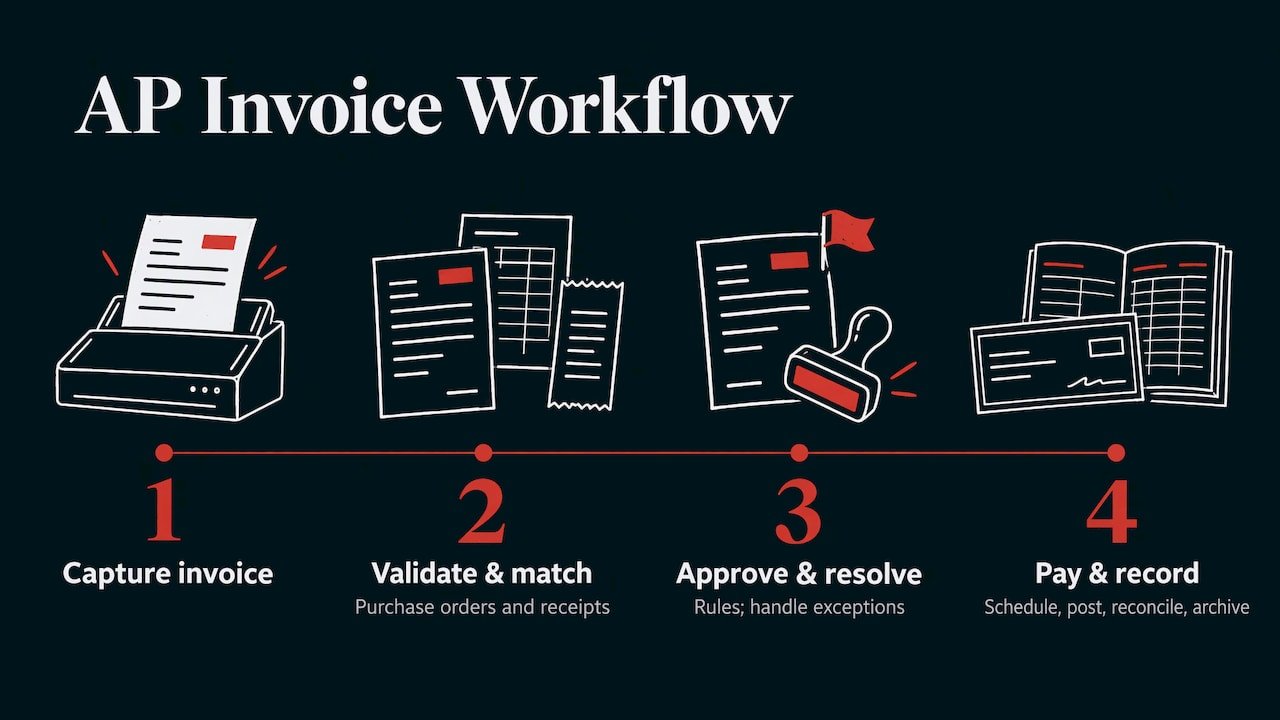
- The automated workflow, step by step
- What the UAE e-invoicing system changes
- Integration with your ERP or accounting system
- Where people still decide
- Costs, benefits and what to measure
- A practical rollout plan
- Promo
- Perspective
- FAQ
- Sources
What automating invoice processing actually covers
Accounts payable (AP) is the function that pays your suppliers. Invoice processing is its core task: getting a supplier’s invoice into your books, checking it, approving it and paying it.
The Association for Financial Professionals’ 2024 guide to automating AP describes automation across the whole invoice-to-payment cycle. Invoices are received electronically or converted from paper using optical character recognition (OCR, software that reads text from images and PDFs). They are then coded, matched to purchase orders and receipts, routed for approval by predefined rules, paid and reconciled. Approvers simply click to approve, and the system archives each invoice with an audit trail.
APQC, a business-benchmarking body, lists seven connected stages that organisations typically automate:
- Receive and capture the invoice (e-invoicing, imaging, OCR or intelligent document processing).
- Enter it into the AP system.
- Validate and match it against purchase orders, receiving documents and vendor records.
- Resolve exceptions using rules.
- Approve and schedule payment.
- Process payment with established controls.
- Retain records and process accruals, reversals, taxes and accounting adjustments.
Not every business needs all seven on day one. A clinic receiving 80 invoices a month may start with capture and approval routing. A trading company with purchase orders and goods receipts will get most value from matching.
The automated workflow, step by step
Below is the sequence, with what each step needs and where it tends to go wrong.
Step 1: Capture invoices into one inbox or portal
Send every supplier to a single channel: a dedicated mailbox, a portal or, for UAE e-invoices, the structured feed from your accredited provider. OCR and machine-learning models extract descriptions, dates, unit prices and payment deadlines. IBM explains that low-confidence fields are routed to a human for review, and that those corrections feed back to improve the models.
Where it goes wrong: invoices still arrive in personal inboxes, on WhatsApp or on paper, so the automated channel only sees half the volume. Decide a cut-off date after which unsent-to-portal invoices are not paid.
Step 2: Validate the data
Before matching, check that the supplier exists in your vendor master, the tax registration number is valid, the invoice number has not been used before and the bank details match the record. Validation of vendor identity through tax IDs and bank details is part of the process IBM describes.
Where it goes wrong: the vendor master is out of date. Automation cannot fix a messy supplier list, so clean it first.
Step 3: Match to purchase orders and receipts
Two-way matching compares the invoice with the purchase order. Three-way matching adds the goods-received note or service confirmation. Invoices that match within your tolerance (for example, a fixed amount or a percentage) pass straight through.
Where it goes wrong: tolerances set too tight flood the exception queue, and tolerances set too loose let overcharges through. Start moderately tight, review the exception report after a month and adjust.
Step 4: Route approvals by rule
Approval rules typically use the invoice amount, department, cost centre or project code. Invoices under a threshold that matched cleanly can be approved automatically. Larger ones go to the right person, who approves with one click, as the AFP guide describes.
Where it goes wrong: approval chains that mirror the org chart rather than the budget. Route by budget owner and set a deputy for leave periods, or invoices sit unseen.
Step 5: Handle exceptions deliberately
This is the step most guides skip, and it decides whether automation saves time. Codebridge’s AP automation guide recommends designing the exception path explicitly: who resolves each failure, what evidence is assembled, which decisions are available and the target time.
A workable starting matrix, adapted from that guide:
| Exception | Owner | Target |
|---|---|---|
| No purchase order | Requester or procurement | Same week |
| Price variance | Buyer or budget owner | 2–3 business days |
| Quantity mismatch | Receiving | 2–3 business days |
| Suspected duplicate | AP team | Same day |
| Bank-detail change | Treasury or a named verifier, never the requester alone | Urgent |
Where it goes wrong: exceptions land in a shared inbox with no owner. Give every exception type a name and a clock.
Step 6: Schedule and release payment
Once approved, payment is scheduled on the due date, or earlier where a discount applies. Sage’s guide gives the example of 1% off if paid within 10 days on Net 10 terms. Payment files can then go to your bank through its banking interface.
Where it goes wrong: payment release without a second control. Keep dual authorisation on the bank side even when everything upstream is automated.
Step 7: Post, reconcile and archive
The invoice and payment post to the general ledger (the master record of your accounts), and the AP balance is cleared when the payment is made. The archive keeps the invoice, approval trail and payment details for audit.
Where it goes wrong: posting to the wrong accounting period or creating duplicates on retry. We cover this in the integration section below.
What the UAE e-invoicing system changes
The UAE is moving business-to-business invoicing to a structured electronic format. That affects how you receive supplier invoices, so it should shape your AP design from the start.
The Ministry of Finance’s Electronic Invoicing Guidelines describe a five-corner model. The supplier’s Accredited Service Provider (ASP, a company authorised by the Federal Tax Authority) validates the invoice and converts it to the UAE standard XML. It sends the invoice to the buyer’s ASP and, in parallel, reports the tax data to the Federal Tax Authority (FTA). The framework supports Arabic and English. The FTA’s e-invoicing page confirms that the ASP validates every field against the UAE data dictionary before exchange over the Peppol network, an international e-invoice exchange standard.
Timelines to plan around
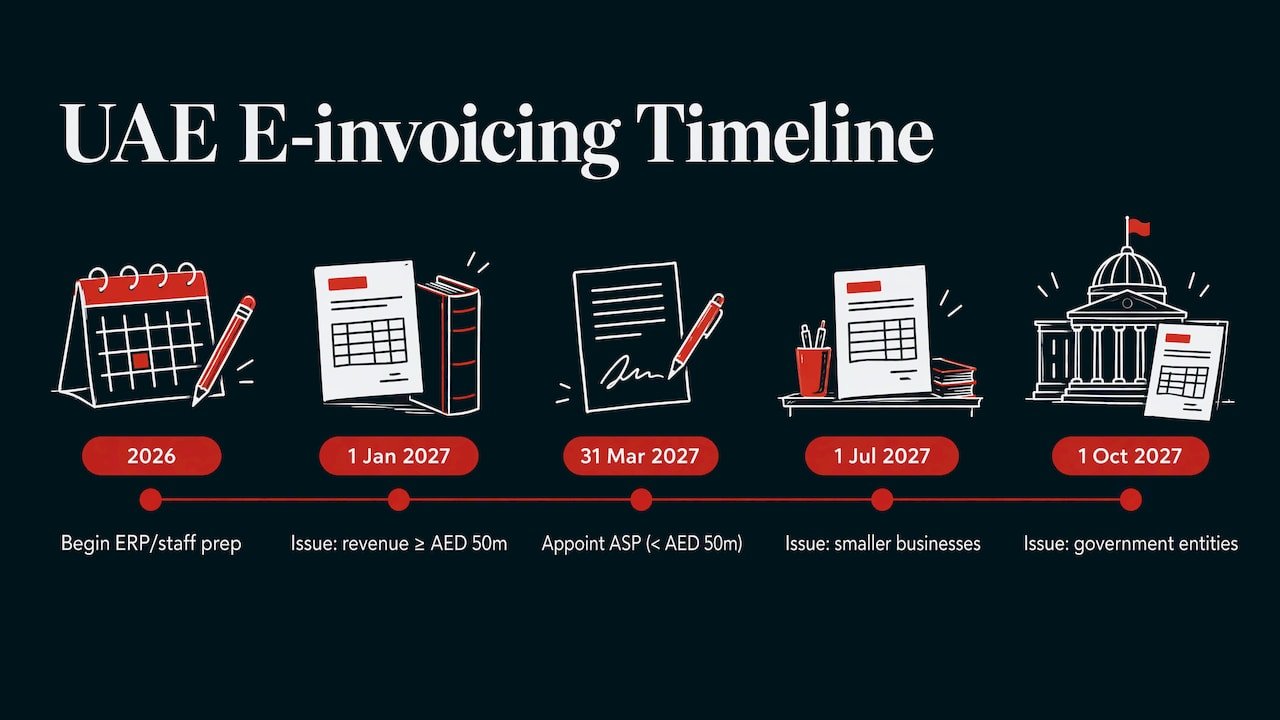
Per a Velmont Crest summary of Ministerial Decisions 243 and 244 of 2025, as amended by decision 66 of 2026, mandatory issuance begins on 1 January 2027 for taxpayers with annual revenue of AED 50 million or more, on 1 July 2027 for smaller businesses and on 1 October 2027 for government entities. The Kayrouz & Associates compliance calendar gives 31 March 2027 as the deadline to appoint an ASP for businesses below AED 50 million. It also warns that ERP integration, ASP onboarding and staff training need to start in 2026 for the January 2027 start, because last-minute adjustments to existing invoicing software will not meet the format.
Penalties apply for failing to appoint an ASP or issue on time. Kayrouz lists AED 5,000 per month for failing to implement or appoint an ASP under Cabinet Decision No. 106 of 2025, and a later cabinet decision revises the scale. Check the FTA page for the penalty schedule in force when you read this.
What this means for your AP workflow
When invoices arrive as structured XML instead of PDFs, much of the OCR work disappears. Wafeq’s explanation is that this allows straight-through processing, including automatic three-way matching and automated recording of input VAT. Note, though, that the network only settles technical delivery. Zoho’s UAE AP guide notes that business acceptance (does the invoice match a real purchase?) and payment approval stay with your AP team.
Before matching, that guide advises validating that:
- the supplier’s tax identification number matches a known supplier record;
- the document type is one of the permitted invoice categories;
- each line carries one of the six tax categories (standard, exempt, out of scope, reverse charge, zero-rated, margin scheme);
- Free Zone invoices include the required beneficiary details.
Duplicates are blocked on supplier tax number plus invoice number, and credit notes are linked to the original invoice. Build these as rules, not as reviewer habits.
You also stay accountable. Hawksford states that businesses remain fully responsible for the accuracy, completeness and timeliness of the data submitted to the FTA even when an ASP is used. It recommends validation checks, exception procedures, segregation of duties, access controls and electronic audit trails.
Record retention
Per Navira Corporate, e-invoice data is kept for five years after the end of the relevant tax period for VAT-registered persons, and longer where there is an open FTA dispute or audit. Records may sit on servers outside the UAE if you can retrieve and reproduce the full data set for the FTA on request. Make sure your archive step meets this from the first day.
Integration with your ERP or accounting system
Most automation projects succeed or fail at the connection between the AP workflow and the ledger. Codebridge’s view is that integration quality, not API versus file transfer, is what counts. In practice, that means:
- Stable identifiers, so a record is never mistaken for a new one.
- Safe retries, so a resend cannot create a duplicate payment.
- Reconciliation between source and destination.
- A visible error queue, not silent failure.
- Traceability back to the original invoice.
The same guide lists common failures: records accepted upstream but rejected downstream with no alert, retries that create duplicates, ambiguous date formats and silently shifted accounting periods. Sultanbyte’s integration guide adds a practical control for UAE e-invoicing: a regular reconciliation job comparing invoices posted in the ERP, versions produced by the integration, exchange statuses from the ASP and reporting statuses on the FTA path.
For your project brief, ask whoever builds the workflow to show you how each of these five properties is met. If you already run Shopify, WooCommerce or WordPress alongside your accounting system, include those order and refund feeds in the same design.
Where people still decide
Automation does not remove judgement. It moves it to where it matters. People still review:
- low-confidence extractions, where the system is unsure what a field says;
- invoices above approval thresholds;
- price, quantity and no-purchase-order exceptions;
- changes to supplier bank details;
- credit notes and disputes.
IBM notes that these decisions can be fed back to improve the extraction models, so the exception rate should fall over time.
Costs, benefits and what to measure
We do not quote a single saving as typical, because it depends on volume, invoice formats and how clean your data is. What you can do is measure your own baseline before the project and compare after. Track these five figures:
| Measure | How to calculate it |
|---|---|
| Cost per invoice | AP staff time plus system costs, divided by invoices processed |
| Cycle time | Days from receipt to payment |
| Exception rate | Share of invoices needing human intervention |
| Duplicate or incorrect payments | Count and AED value per quarter |
| Early-payment discounts captured | Value captured against value available |
The cost side includes software or provider fees, integration work, ASP fees under the UAE system, training, and a parallel-running period. Velmont Crest advises requesting a written implementation quote scaled to your invoice volume and ERP integrations, and running parallel issuance for at least one quarter before the mandatory go-live. The same quarter is a sensible time to compare your automated and manual figures.
The Ministry of Finance says its e-invoicing guide includes a readiness framework and checklist, plus defined roles and responsibilities. Use it to assign owners for each stage.
A practical rollout plan
- Map the current process. Count invoices per month, by channel and by supplier type. Note who approves what.
- Clean the vendor master. Remove duplicates, confirm tax numbers and bank details.
- Write the rules. Matching tolerances, approval limits, exception owners and target times.
- Confirm your ASP and ERP readiness for the e-invoicing timeline that applies to your revenue band.
- Pilot with one supplier group, ideally your highest-volume regular suppliers.
- Run in parallel for a quarter, comparing results against the manual process.
- Switch over and review monthly, using the five measures above.
Promo
If your invoices sit alongside orders, enquiries and bookings that all need to flow into one system, the workflow is bigger than an AP tool. Our AI workflow automation work is built around connecting those systems so that routine steps run on rules and your team handles exceptions. We work with businesses in Dubai and Abu Dhabi, and our workflow automation services guide explains what a project includes.
To discuss your own invoice process, start with our AI workflows and automation page.
Perspective
Most invoice automation projects we see discussed fail on process, not on technology. A tool that reads invoices is the easy part. What decides the outcome is whether the business has agreed who owns each exception, what the matching tolerances are and how the ledger is kept in step.
Our approach to automation starts from the data and the real workflow rather than from a template. The UAE adds a second reason to work this way. With e-invoicing arriving in 2027, the invoice stops being a document and becomes a data record that passes through an ASP, your ERP and your approvers. A workflow designed around that record, with clear rules and an audit trail, will serve you after the deadline as well as before it.
We also treat reporting honestly. If a rule produces too many exceptions or a step is not saving time, the numbers should show it, and the rule should change. That is how automation keeps paying back.
the author
FAQ
Can you automate invoice processing completely?
Most of it, yes: capture, validation, matching, routing and posting can run on rules. People still handle exceptions, approvals above thresholds and low-confidence extractions. A well-tuned workflow aims to keep those to a small share of invoices.
What are the steps in an automated invoice workflow?
The sequence is capture, validation, matching to purchase orders and receipts, approval routing, exception handling, payment scheduling and posting with archiving. APQC describes seven connected stages that follow this order.
How do I automate my accounts payable workflow if I have no purchase orders?
Start with capture, validation, approval routing by cost centre and duplicate checks, which do not need purchase orders. Treat missing-PO invoices as an exception type with an owner and a target time, and introduce purchase orders for your largest suppliers first.
Does UAE e-invoicing affect how I receive supplier invoices?
Yes. Once your supplier issues through the system, you receive structured XML through your own ASP. Mandatory issuance starts on 1 January 2027 for businesses with revenue of AED 50 million or more and on 1 July 2027 for others, per the Velmont Crest summary. Check the FTA’s e-invoicing page for current requirements.
Sources
- What Is Invoice Workflow Automation? APQC
- What is Automated Invoice Processing? IBM
- How to Automate Accounts Payable: A Step-by-Step Guide, Codebridge
- What is Invoice Processing? Sage
- UAE Electronic Invoicing Guidelines, Ministry of Finance
- Ministry of Finance issues UAE Electronic Invoicing Guidelines
- UAE e-invoicing, Federal Tax Authority
- New UAE VAT Law 2026: Changes and How to Adjust, Velmont Crest
- UAE Compliance Calendar 2026, Kayrouz & Associates
- UAE FTA e-invoicing: what your accounting system must support, Wafeq
- UAE AP eInvoicing: receiving and matching invoices, Zoho
- UAE e-invoicing: timeline, business actions and penalties, Hawksford
- UAE E-Invoicing 2026–2027, Navira Corporate
- UAE e-invoicing in production: an integration guide, Sultanbyte